241103 - Najprostszy RAG
Spis Treści #
- 1 - Co tu zrobimy
- 2 - Od czego zaczynamy?
- 3 - Dodajmy lokalny LLM
- 4 - RAG - Retrieval Augmented Generation
- 5 - Całość kodu wynikowego
- 6 - Wartościowe linki powiązane
1. Co tu zrobimy #
Kontynuujemy artykuł 241102-embeddings, dodajemy LLM do bazy wektorowej i dostajemy pełnoprawnego (choć prostego) RAGa.
- Dodajemy lokalny LLM (użyjemy Microsoft Phi-3.5 Mini Instruct)
- Zrobimy prosty RAG (ze wzbogaconym promptem)
2. Od czego zaczynamy? #
Nie podaję żadnych funkcji pomocniczych (bo je macie); zacznijcie od poprzedniego dokumentu.
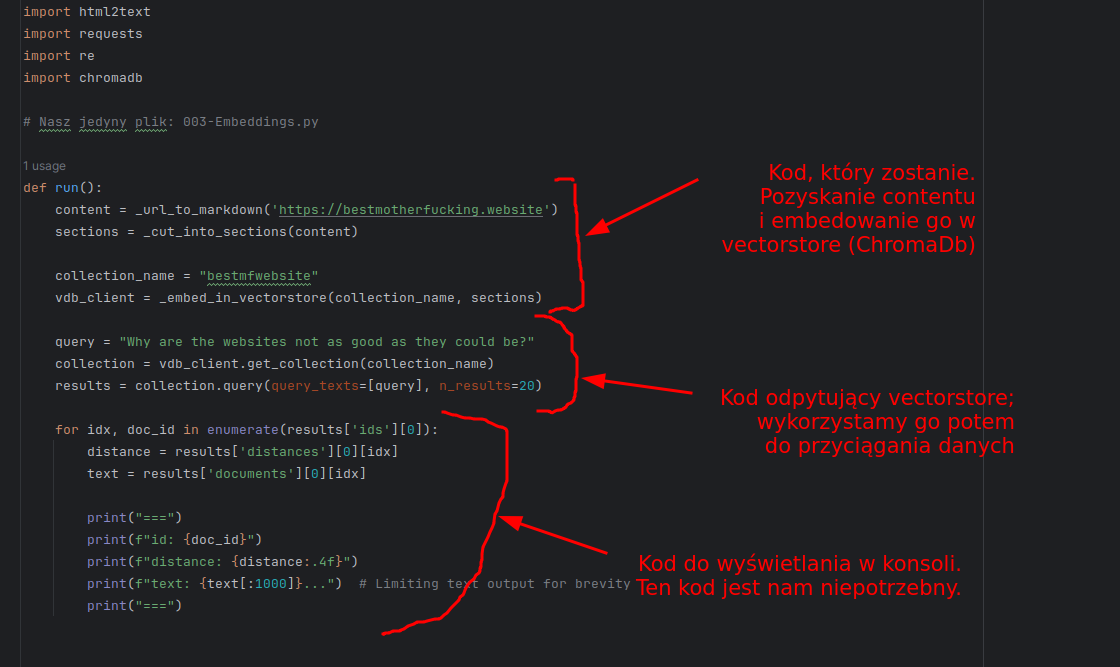
A jako kod - wychodzimy od tego (wszystkie funkcje macie):
def run():
    content = _url_to_markdown('https://bestmotherfucking.website')
    sections = _cut_into_sections(content)

    collection_name = "bestmfwebsite"
    vdb_client = _embed_in_vectorstore(collection_name, sections)
3. Dodajmy lokalny LLM #
3.1. Co i dlaczego #
Założenie - już zainstalowaliście lokalny LLM. Jak nie, tu macie informację jak.
Naszym celem jest zainicjalizować lokalny LLM; w moim wypadku Microsoft phi-3.5-mini-instruct, który wyszedł całkiem niedawno. Dlaczego ten (wszystkie dane są pod linkiem):
- RAG działa tym lepiej im większe okno kontekstu można podać (więcej danych które "widzi" jednocześnie).
- "The model belongs to the Phi-3 model family and supports 128K token context length"
- Pracujemy z danymi w języku angielskim; nie potrzebuję wielojęzyczności dostarczonej przez Mixtral / Llama
- choć podobno poradzi 3.5 poradzi sobie lepiej niż 3; może warto sprawdzić
- Mam RTX 2070. Nie załaduję silniejszego modelu niż 7 GB VRAM (a realnie, 4-5 GB VRAM).
- phi 3.5 jest sympatycznie niewielki
- Benchmark jest good enough w celu "Retrieval"
Na podstawie powyższych danych można ocenić kluczowe rzeczy:
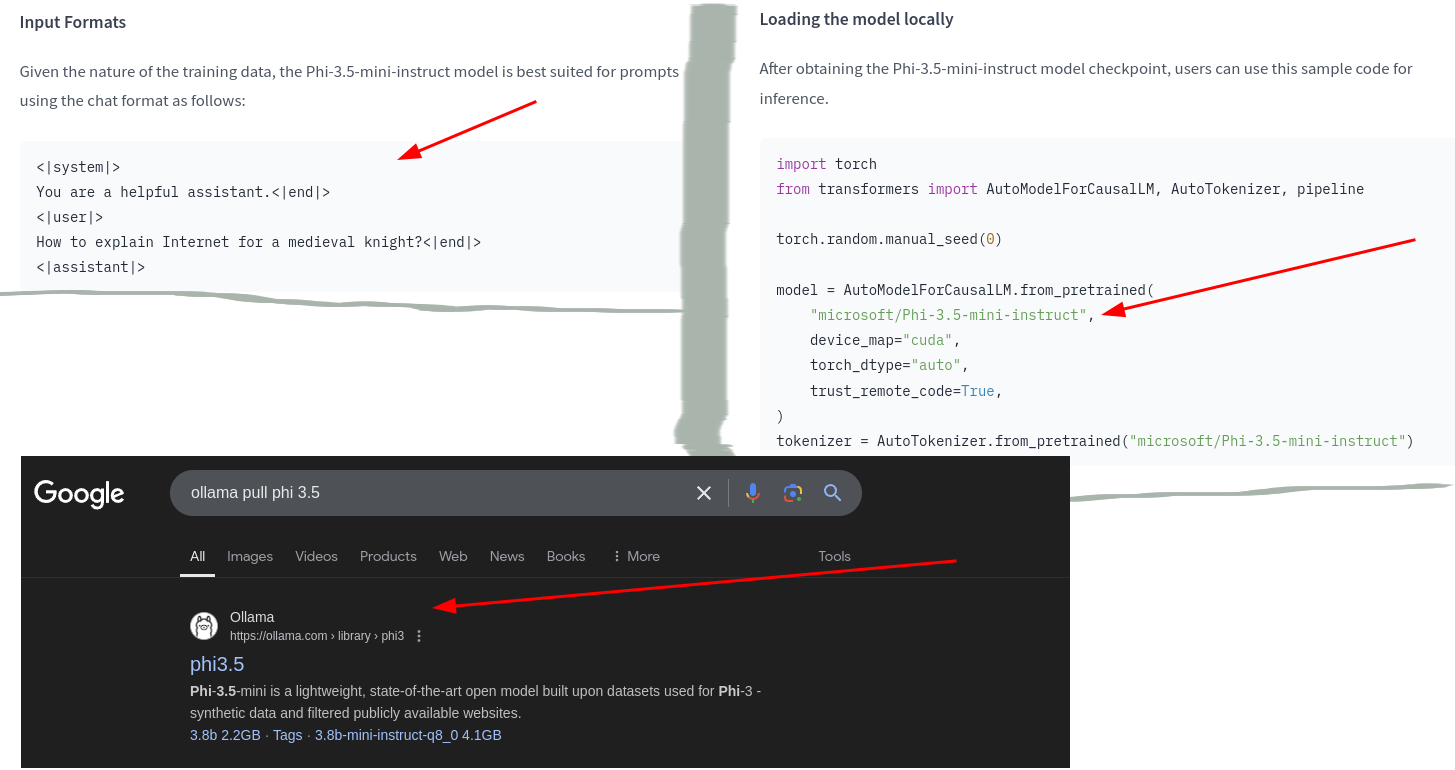
- Znamy sposób, w jaki się komunikować z tym modelem (tagi typu
<|user|>itp.) - Wiemy, jak ściągnąć model przy użyciu ollama (ze strony ollama)
Niestety, jako, że phi-3.5-instruct-fp16 kosztuje 7.6 GB, nie mogę go użyć. Ściągnę zatem q8 (kwantyzacja wykorzystująca 8b a nie 16b).
3.2. Implementacja #
Wpiszmy zatem:
ollama pull phi3.5:3.8b-mini-instruct-q8_0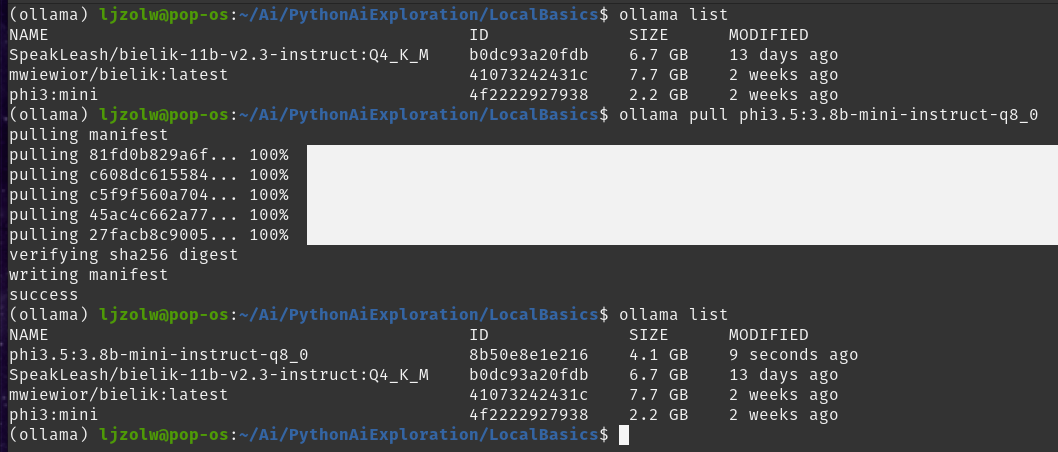
Teraz napiszmy kod konfigurujący klienta LLM (punkt 3 poniżej):
def run():

    # 1. Acquire content
    content = _url_to_markdown('https://bestmotherfucking.website')
    sections = _cut_into_sections(content)

    # 2. Embed content in vectorstore
    collection_name = "bestmfwebsite"
    vdb_client = _embed_in_vectorstore(collection_name, sections)

    # 3. Add local LLM
    selected_llm = "phi3.5:3.8b-mini-instruct-q8_0"
    llm_client = openai.OpenAI(base_url="http://localhost:11434/v1", api_key="nokeyneeded")
Jeśli chcecie przetestować czy to działa, robicie tak:
    # 4. Diagnostics
    question = "What is a cat? Answer in 10 words."
    print(question)
    messages = [{"role": "system", "content": "you are an assistant answering questions" }]
    messages.append({"role": "user", "content": question})
    response = llm_client.chat.completions.create(
        model=selected_llm,
        messages=messages,
        temperature=0.3,
        max_tokens=400
    )

    print(response.choices[0].message.content)
Dostaniecie następujący wynik:
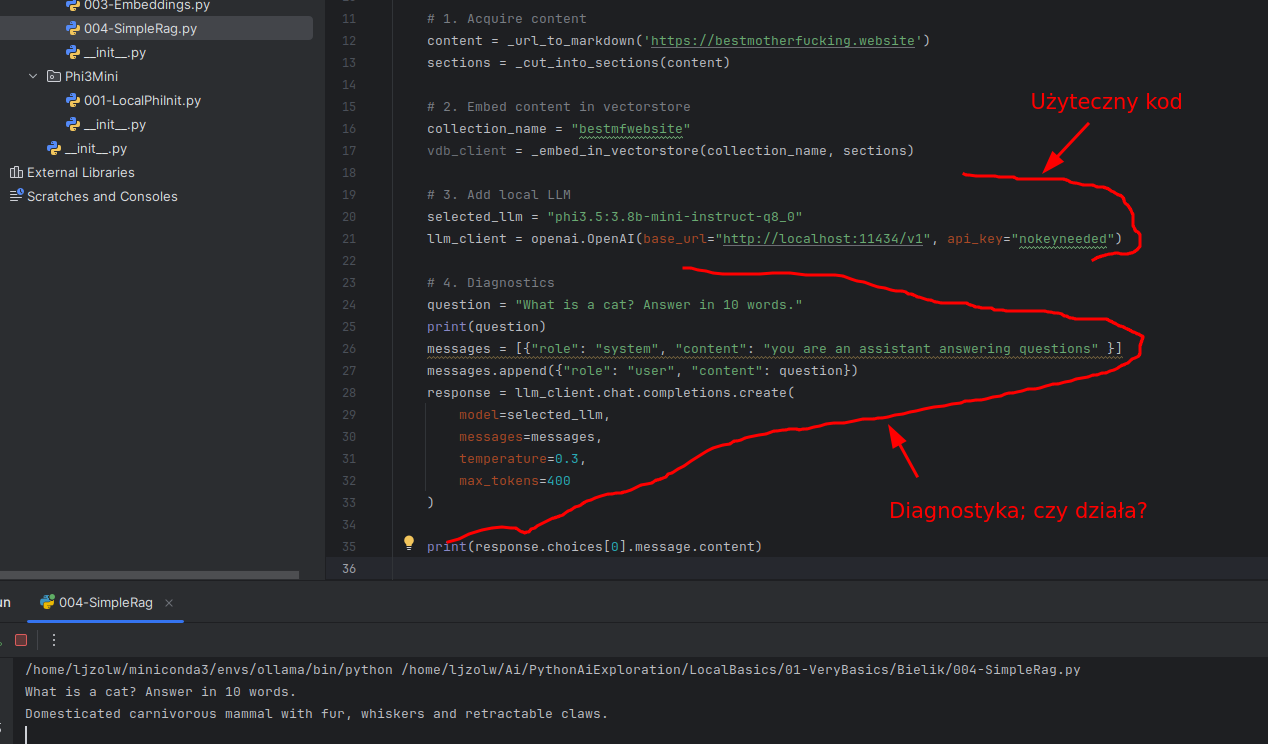
Na razie kod odczytujący dane z LLM nas nie interesuje. Ale ważne, że mamy:
- ChromaDb i embedowane dane w formie wektorów (z poprzedniego artykułu)
- Lokalny LLM na bazie phi3.5 (z pierwszego artykułu)
I teraz czas to połączyć. Zróbmy RAG.
4. RAG - Retrieval Augmented Generation #
4.1. Co i dlaczego #
Jedną z największych obietnic LLMa jest zrobienie sobie własnego RAGa; czegoś, co pozwoli LLMowi pracować na naszej własnej bazie wiedzy.
O co chodzi:
- użytkownik wpisuje query, np. "jak się robi konkretne zapytanie w LINQ"
- query jest wysłane do bazy wiedzy (baza wektorowa, grafowa, SQL...) i otrzymujemy serię materiałów z bazy wiedzy pasujących do query
- prompt do LLM zostaje wzbogacony o kontekst (odpowiedź z bazy wiedzy)
- LLM odpowiada na bazie kontekstu
- czyli przekształcamy problem "odpowiedz na pytanie" w problem "streszczenia danych z bazy wiedzy", co jest tysiąc razy prostsze dla LLMa.
Mamy różne strategie jak do tego podejść:
- Możemy użyć bazy wektorowej, gdzie to samo query wyjmuje dane z vectorstore i trafia potem do LLMa
- Możemy użyć agentów i stworzenia zapytanie do bazy danych / tysięcy materiałów i artykułów...
Serio, jest mnóstwo sposobów. My najpierw zrobimy to z vectorstore; mamy wszystko co nam potrzebne (vectorstore, llm). Ale i tak problem leży mniej w idealnym LLM a bardziej w prawidłowym odpytywaniu bazy wiedzy, przygotowaniu danych itp.
Więc, zróbmy to naiwnie.
4.2. Implementacja #
4.2.1. Kroki #
Podzielmy to na sensowne kroki:
- Pozyskanie query od użytkownika
- f(Query -> Kontekst) z bazy wiedzy (u nas: ChromaDB)
- f(Kontekst -> Prompt); wzbogacamy prompt mający trafić do LLMa
- Wysyłamy prompt do LLMa i dostajemy odpowiedź
- Powtórzmy powyższe
Czyli wysokopoziomowo (bez implementacji funkcji):
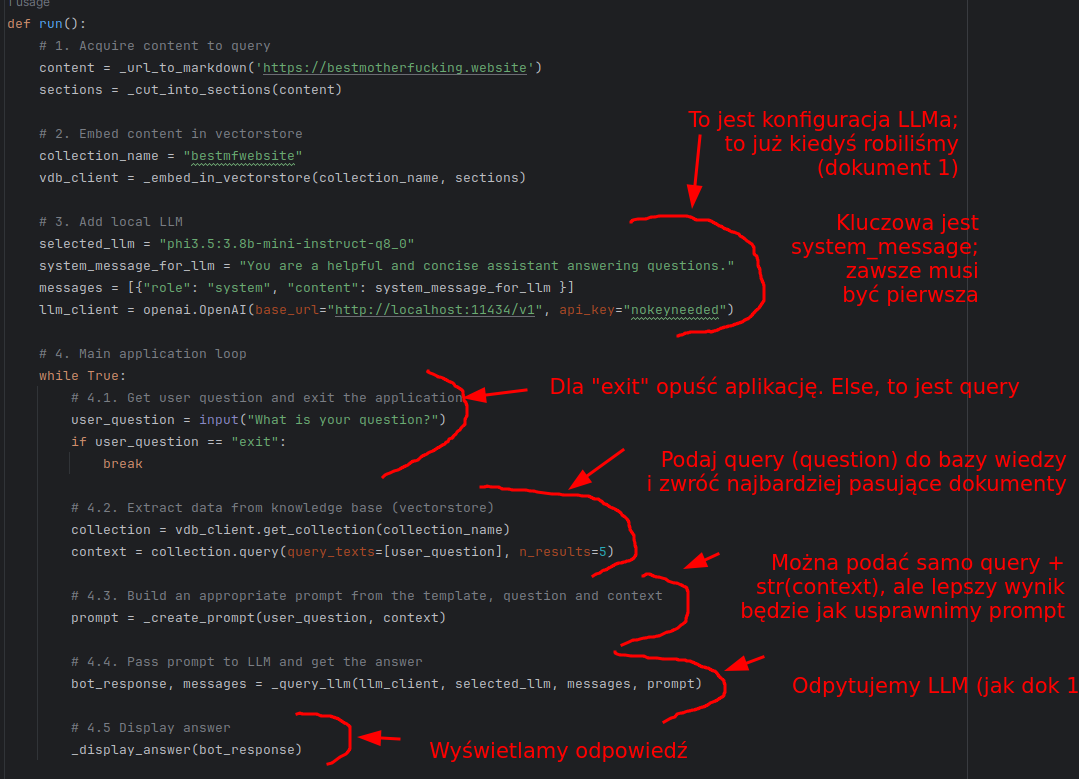
Kod całościowo podam Wam potem. Czas przejść do implementacji poszczególnych funkcji i konceptów.
4.2.2. Tworzymy prompta (krok 4.3) #
Najprostszy prompt wyglądałby jakoś tak (pokazuję a potem wyjaśniam):
def _create_prompt(user_question: str, context) -> str:

    aggregated_context = ""
    for doc in context['documents'][0]:
        aggregated_context += doc + "\n"

    prompt = f"""<|user|>

    Answer the question considering this context.
    User question: {user_question}

    Here's the context to assist you:
    {aggregated_context}

    <|assistant|>"""
return prompt- Specjalne tagi "<|user|>" i "<|assistant|>" pochodzą z karty modelu ("Jak się zwracać do tego modelu"); wkleiłem to wcześniej.
- Są różne sposoby komunikacji z różnymi modelami
- To mi przypomina; muszę naprawić kod by użyć "<|system|>"; na rysunku jest system_prompt bez tego tagu
- Są różne sposoby komunikacji z różnymi modelami
- Wpierw budujemy
aggregated_contextjako pojedynczy string; potem podajemy go do LLM jako kontekst odpowiedzi - Musimy wpierw podać instrukcję, potem pytanie użytkownika, potem kontekst
Oczywiście, można też zrobić to lepiej. Co by nam się przydało?
- Niech contekst jest podzielony na sekcje, żeby od razu było wiadomo co do której wiadomości kontekstu należy
- Wykorzystam do tego specjalne tagi xmlowe; <context_component>instancja</context_component>
- Ale to znaczy, że w prompcie muszę powiedzieć, że to zrobiłem
- Niech wie, że nie każdy element kontekstu na 100% pasuje do sytuacji. Czasem nie wszystko pasuje.
- Dodać do prompta.
Do tego warto zauważyć, że LLM zwykle świetnie sobie radzi z tagami xmlowymi. Dlatego mam zamiar je dobrze wykorzystać :-).
def _create_prompt(user_question: str, context) -> str:
    opener = "<context_component>"
    closer = "</context_component>"

    aggregated_context = ""
    for doc in context['documents'][0]:
        aggregated_context += opener + "\n" + doc + "\n" + closer

    prompt = f"""<|user|>
        <instruction>
        Answer the question considering this context. Some pieces of context will be relevant, some will not be.
        Separate pieces of context are encapsulated in the xml tags '<context_component>'.
        In case of no relevant information in the context at all, write "No relevant information in context".
        </instruction>

        <user_question>
        {user_question}
        </user_question>

        Here's the context to assist you:

        {aggregated_context}

        <|assistant|>
        """
    return prompt
Ten prompt da się usprawnić, ale na razie - do naszych celów - wystarczy.
4.2.3. Przekażmy wiadomość do LLMa (krok 4.4) #
To już zrobiliśmy w dokumencie 1. Tak, wiem, że w Pythonie nie muszę zwracać obiektów przekazanych przez referencję jako parametry funkcji, ale uważam za dobrą praktykę zwrócenie wszystkiego co zmieniam, nawet jak to przekazałem wcześniej (dla czytelności).
Ustawiłem temperaturę 0.2, by zredukować kreatywność (0 oznacza "niska kreatywność", 1 oznacza "wysoka kreatywność + potencjał na halucynacje")
def _query_llm(llm_client, selected_llm, messages, prompt):
    messages.append({"role": "user", "content": prompt})

    response = llm_client.chat.completions.create(
        model=selected_llm,
        messages=messages,
        temperature=0.2,  # Low temperature to hallucinate less
        max_tokens=400
    )

    bot_response = response.choices[0].message.content
    messages.append({"role": "assistant", "content": bot_response})

    return bot_response, messages
4.2.4. Wyświetlamy odpowiedź (krok 4.5) #
Zobaczmy odpowiedź LLMa oraz jakie dane zostały przekazane do LLMa z vectorstore.
- Oczywiście, dopiero teraz się zorientowałem, że kod formatujący dane do LLM jest też kodem nadającym się do wyświetlenia na output.
- Wyciągnąłem kod zamykający context w "<context_component>" do nowej funkcji, "_aggregate_contexts_to_str"
- Wykorzystuję go w wyświetlaniu
I wynikowo:
def _aggregate_contexts_to_str(context):
    opener = "<context_component>"
    closer = "</context_component>"
    aggregated_context = ""
    for doc in context['documents'][0]:
        aggregated_context += opener + "\n" + doc + "\n" + closer
    return aggregated_context

def _format_answer_for_print(bot_response, context):
    return f"""# ANSWER

    {bot_response}

    # CONTEXT

    {_aggregate_contexts_to_str(context)}
    """
4.3. Odpalmy naszą aplikację #
To... nie będzie najczytelniejsze. Ale zadziała :-).
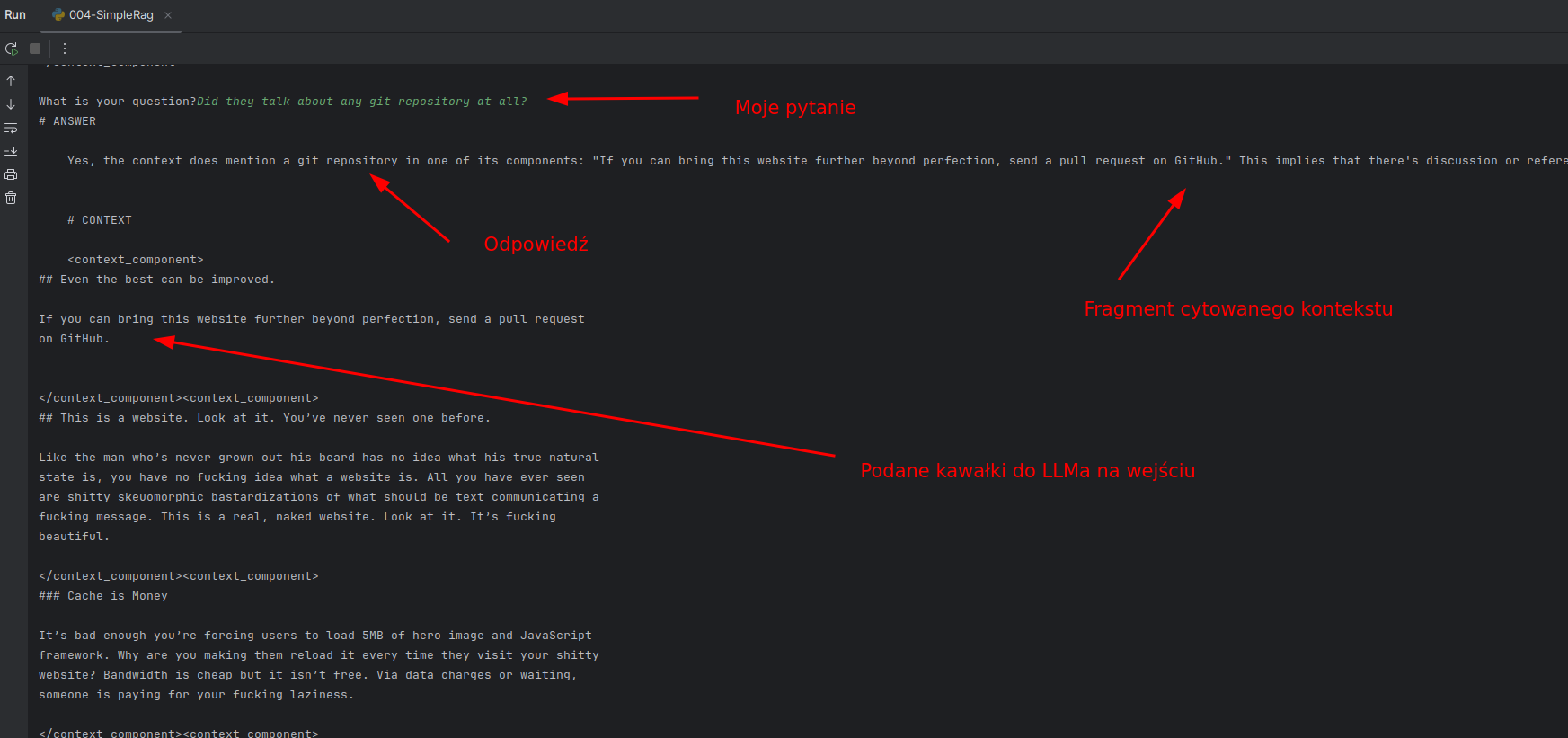
Zrobiłem kilka testów. Zadziałało jak chciałem:
- Ma dostęp do całej historii konwersacji (póki nie przekroczymy okna kontekstu)
- Nie znalazłem na razie żadnej halucynacji
Oczywiście, to jest tylko proof of concept. Na jednym dokumencie to nic wielkiego. Ale teraz można:
- Dodać więcej dokumentów do vectorstore
- Pobawić się z chunkowaniem. Zdania? Markdown? Jakieś hybrydowe? Semantic?
- Pobawić się z konfiguracją prompta do LLMa...
Widzicie jak to działa. Dość proste :-).
5. Całość kodu wynikowego #
import html2text
import requests
import re
import chromadb
import openai

# Nasz jedyny plik: 004-SimpleRag.py

def run():
    # 1. Acquire content to query
    content = _url_to_markdown('https://bestmotherfucking.website')
    sections = _cut_into_sections(content)

    # 2. Embed content in vectorstore
    collection_name = "bestmfwebsite"
    vdb_client = _embed_in_vectorstore(collection_name, sections)

    # 3. Add local LLM
    selected_llm = "phi3.5:3.8b-mini-instruct-q8_0"
    system_message_for_llm = "<|system|>\nYou are a helpful and concise assistant answering questions."
    messages = [{"role": "system", "content": system_message_for_llm }]
    llm_client = openai.OpenAI(base_url="http://localhost:11434/v1", api_key="nokeyneeded")

    # 4. Main application loop
    while True:
        # 4.1. Get user question and exit the application
        user_question = input("What is your question?")
        if user_question == "exit":
            break

        # 4.2. Extract data from knowledge base (vectorstore)
        collection = vdb_client.get_collection(collection_name)
        context = collection.query(query_texts=[user_question], n_results=5)

        # 4.3. Build an appropriate prompt from the template, question and context
        prompt = _create_prompt(user_question, context)

        # 4.4. Pass prompt to LLM and get the answer
        bot_response, messages = _query_llm(llm_client, selected_llm, messages, prompt)

        # 4.5 Display answer
        print(_format_answer_for_print(bot_response, context))

def _format_answer_for_print(bot_response, context):
    return f"""# ANSWER

    {bot_response}

    # CONTEXT

    {_aggregate_contexts_to_str(context)}
    """

def _query_llm(llm_client, selected_llm, messages, prompt):
    messages.append({"role": "user", "content": prompt})

    response = llm_client.chat.completions.create(
        model=selected_llm,
        messages=messages,
        temperature=0.2,  # Low temperature to hallucinate less
        max_tokens=400
    )

    bot_response = response.choices[0].message.content
    messages.append({"role": "assistant", "content": bot_response})

    return bot_response, messages

def _aggregate_contexts_to_str(context):
    opener = "<context_component>"
    closer = "</context_component>"
    aggregated_context = ""
    for doc in context['documents'][0]:
        aggregated_context += opener + "\n" + doc + "\n" + closer
    return aggregated_context

def _create_prompt(user_question: str, context) -> str:
    aggregated_context = _aggregate_contexts_to_str(context)
    prompt = f"""<|user|>
        <instruction>
        Answer the question considering this context. Some pieces of context will be relevant, some will not be.
        Separate pieces of context are encapsulated in the xml tags '<context_component>'.
        In case of no relevant information in the context at all, write "No relevant information in context".
        </instruction>

        <user_question>
        {user_question}
        </user_question>

        Here's the context to assist you:

        {aggregated_context}

        <|assistant|>
        """
    return prompt

def _embed_in_vectorstore(collection_name: str, sections: list[str]):
    chroma_client = chromadb.Client()
    collection = chroma_client.get_or_create_collection(
        name=collection_name,
        metadata={"hnsw:space": "cosine"}
    )

    ids = [f"id_{index}" for index, _ in enumerate(sections)]
    collection.add(
        documents=sections,
        ids=ids
    )
    return chroma_client

def _cut_into_sections(markdown_text: str) -> list[str]:
    # Ten regex działa tak:
    # dzielimy po h1-h4 ('#' - '####'); '#' to h1, '##' to h2...
    # następnie ?= oznacza lookahead; czyli tak długo dodaje do grupy którą dzieli aż się pojawi kolejny nagłówek lub \Z, czyli koniec pliku / tekstu
    pattern = r'(#{1,4} .+?)(?=\n#{1,4} |\Z)'
    sections = re.findall(pattern, markdown_text, re.DOTALL)
    return sections

def _url_to_markdown(url: str):
    response = requests.get(url)

    if response.status_code == 200:
        converter = html2text.HTML2Text()
        converter.ignore_links = True
        markdown_text = converter.handle(response.text)
        return markdown_text

run()